Video Calling System
We will now upgrade our Chat System solution to handle video calls, recordings and group calls just like we have in popular applications like Microsoft Teams. For the functional requirements we have the following:
- 1 on 1 calling feature - This allows for individual, private conversations between two participants.
- Group calls - This allows multiple participants to join a call together for group discussions and collaborations.
- Audio/video/screen share - This functionality allows participants to share their audio, video, or computer screen during the call for more immersive and interactive meetings.
- Record call functionality - This feature allows for the recording of the call, which can be saved and reviewed later for reference or training purposes.
These are some non-functional requirements we have to consider:
- Performant - This refers to the performance of the video conferencing solution, including the speed of connection, call establishment, and media transmission. This is critical for ensuring a smooth and seamless user experience.
- High availability - This refers to the reliability and uptime of the video conferencing solution. This is important for ensuring that the solution is always accessible and available for use when needed.
- Some degree of data loss is acceptable during the video conferencing process. This may refer to minor data loss, such as a slight degradation in video or audio quality, or it may refer to larger data losses, such as an interruption in the call.
The system must support both client-server communication and peer-to-peer communication, using a combination of HTTPS and WebSockets (a bi-directional protocol). The video conferencing system is built on top of the TCP transport protocol (using a 3-way handshake), with an emphasis on reducing data loss by ordering packages and including an ID for each package. The system supports congestion control and deduplication. However, for video calling, the system uses UDP, which is a faster but less reliable protocol that doesn't retry lost packages. API calls will still go through TCP, but video packages will be transmitted over UDP.
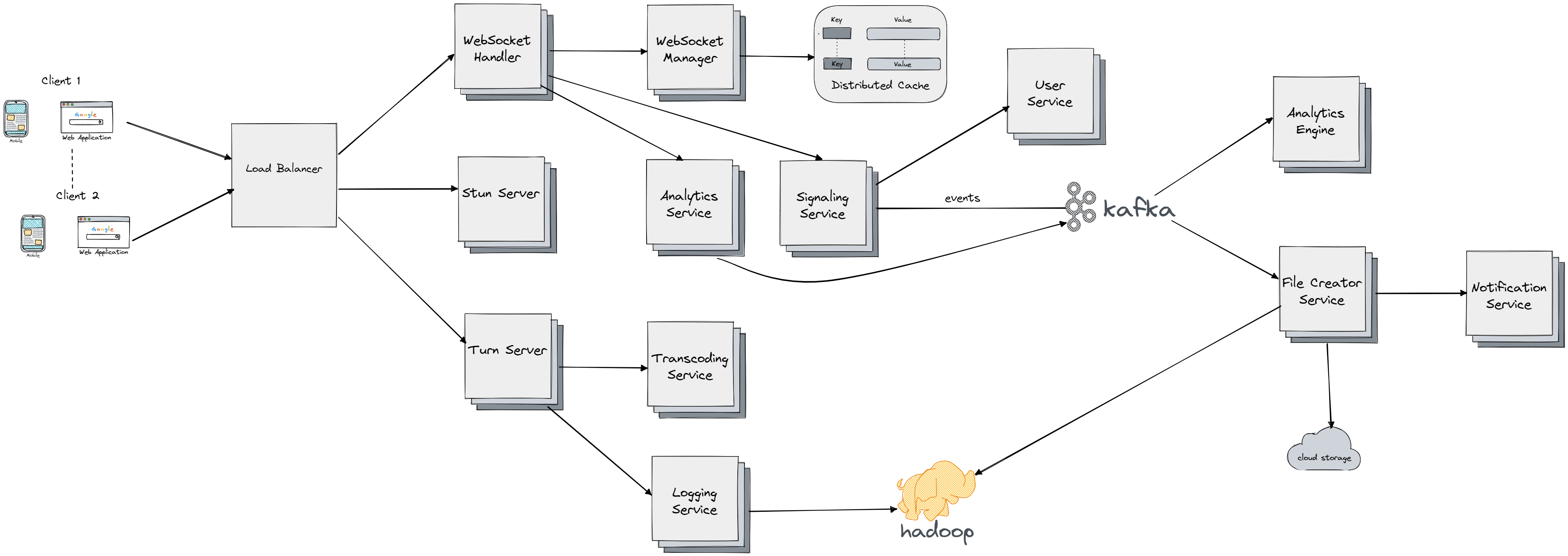
Now let's go through each components of the system:
- We have the same three components Load Balancers, WebSocket Handlers and WebSocket Manager as in Chat System.
- Load Balancers - to uniformly distribute our load to WebSocket Handler and other services.
- WebSocket Handlers - It keeps a bi-directional connection with a certain user, it sends an events each time there is a new message for the user it maps to, leading to message appearing on user device. It also caches the mapping of connections and maintains the mapping for other users (to know where to send a message) for a short time. The users will share their IP addresses and other information (like bandwith, encodings supported) through one of the websocket handlers and make a mutual decision on how to create a connection.
- WebSocket Manager - This component manages the mapping of users to WebSockets. It sits in front of distributed cache (Redis) which store the mapping between users and websocket handlers.
- WebSocket handler communicates with Signaling Service to send events about the current call like termination, and also to get information about the other clients from the User Service (for example if client 1 wants to connect with client 2 on Facebook they have to be friends or similar restrictions)
- We will have Analytics Services that will track events during the call (changes in WiFi, duration of call) and send the events to the Kafka Cluster which will then propagate it to Analytics Engine on which we can run any processing like ML models to help us make bussiness decisions
- To enable peer-to-peer communication (video transfer over UDP protocol) each of the peers need to know the others IP address. In WebRTC (Web Real-Time Communication) we have a special component called
Stun(in our case Stun Server) which is used to fetch the pubic IP address of the IPS server user device is connecting to, this IP address will be the idenfiticator during the peer-to-peer communication. - If a UDP transport is not allowed (for example because of firewall) we need to have a middleman that will enable the communication to flow between the users. In our design that component is called Turn Server and you can think of it as component that we can easily scale if the load increases and as a central place for communication between users. It would be really hard to enable video recording support if the communication was decentralized. So that's one of the the responsibilities of the Turn Server it sends small chunks of the video being recorded to the Logging Service which propagates it to distributed file system like Hadoop. Once the call is terminated an event is sent from the Signaling Service to Kafka, which propagates it to File Creator Service which takes all the chunks of the video and aggregates them and stores them into cloud storage like S3. In group chat we will have users with many different network bandwidths, devices and resolutions which means we will have replicated chunks to fit any of these options. That's the job of the Transcoding Service (to learn more about it check Video Sharing Platform). The transcoding service adjusts the video quality based on bandwidth and encoding requirements, and can convert the video to a low-definition format for users with limited bandwidth. It runs on the same machine as the Turn Server to minimize the latency.