Video Sharing Platform
Here are the functional requirements for a video platform:
- Upload Videos: The platform should have a user-friendly interface that allows users to upload videos from their devices.
- User Homepage and Search: The platform should have a user homepage where users can access and manage their uploaded videos. Additionally, the platform should have a search function that allows users to search for videos by keywords, titles, or tags.
- Play Videos: The platform should have a video player that allows users to play uploaded videos. The video player should have basic playback controls such as play, pause, and skip. The platform should also support different video resolutions, and the user should have the ability to switch between them.
These are basic functional requirements for a video platform. Depending on the specific needs and requirements of the project, additional features such as video sharing, commenting, and rating may be necessary.
The non-functional requirements for the video platform:
- Video Format and Resolution Support: The system should accept most of the commonly used video formats and resolutions, and the supported formats and resolutions should be clearly stated.
- Encryption: The platform should use encryption to ensure the privacy and security of uploaded videos and user data.
- Fast Upload: The platform should have a fast and efficient upload process that allows users to upload videos quickly and easily.
- Smooth Video Streaming: The platform should provide a smooth and seamless video streaming experience with no buffering or lag.
- Video Quality: The platform should allow users to switch between different video resolutions, depending on their internet speed and device capabilities.
- Low Infrastructure Cost: The platform should have a low infrastructure cost, making it affordable for a wide range of users.
- High Availability, Scalability, and Reliability: The platform should have a high level of availability, scalability, and reliability, ensuring that users can access their videos and the platform at all times.
- Client Support: The platform should be accessible from mobile apps, web browsers, and smart TVs.
- No Buffering: The platform should have low latency and high availability, ensuring that video streaming is smooth and seamless.
- User Session Recommendation Engine: The platform should have a recommendation engine that suggests videos based on the user's viewing history and preferences.
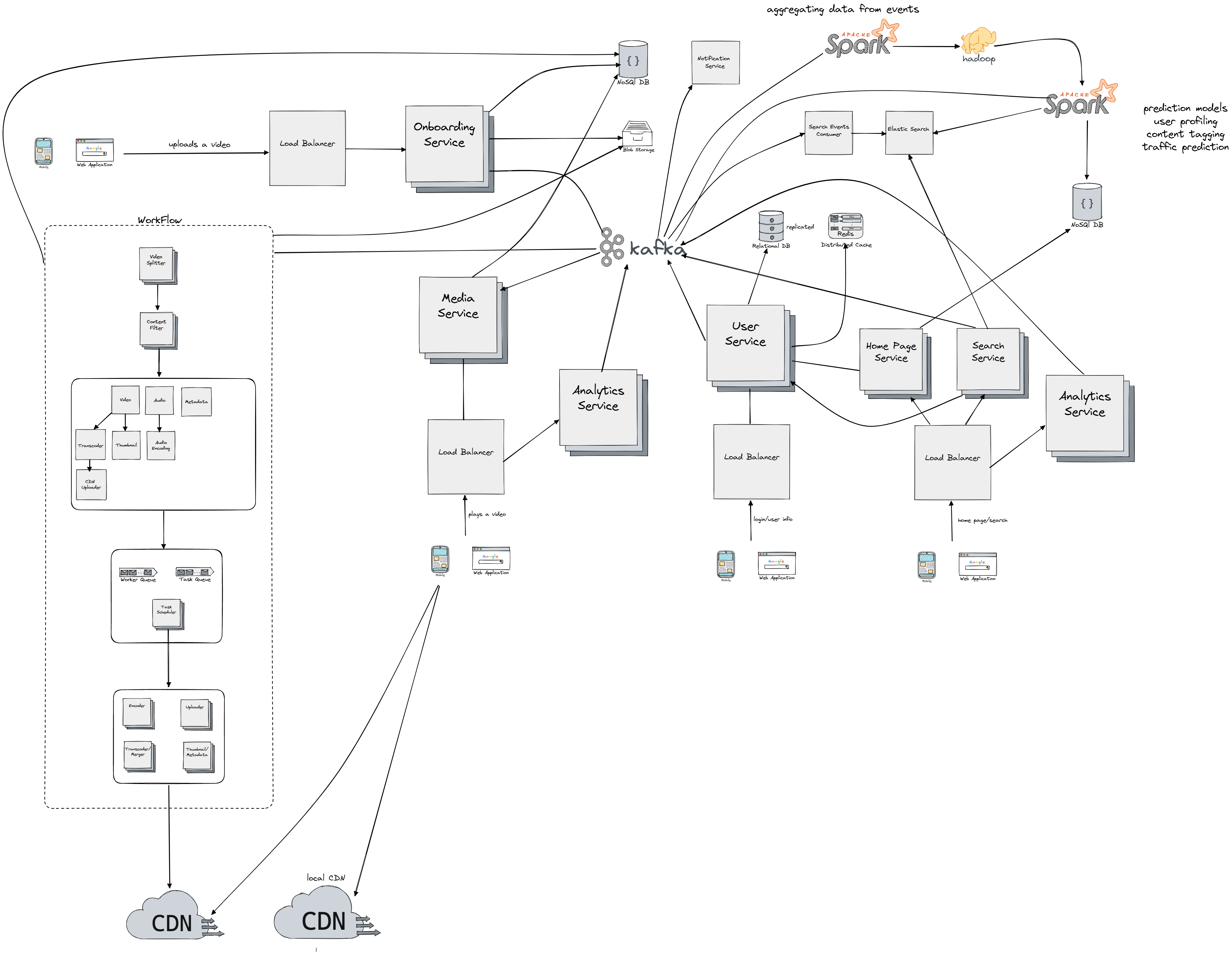
Upload Video Flow
First let's take a look at the upload video flow and each of the components of the flow:
- We use load balancer component to uniformly distribute the load coming from users and to redirect user requests to the closest (or any other routing algorithm we might use) Onboarding Service
- Onboarding Service sits in front of NoSql database we use to check the status of the videos, metadata and similar. On upload request the onboarding service produces new event that's fed into Kafka cluster (which is the central piece for inter-service communication). It has also connection to blob storage ("A Binary Large Object (BLOB) is a collection of binary data stored as a single entity in a database management system") to be able to store the video from the source.
- Kafka Cluster then consumes the upload request event and sends a new event to our WorkFlow unit which is responsible for all required operations on the uploaded video.
- After all operations have been executed on the upload video, we consider the video upload completed and we send a new event to Kafka cluster which in return produces new event/message for notification service. Notification Service notifies the user of a successful upload.
- WorkFlow unit is a sequence of operations required to be done on each of the uploaded videos and each step in the workflow has a unique responsibility. It would be hard to do the tranformation on the whole video since for example we can reach sizes of 40 or more GB, because of that we have to split the video into chunks also known as Group of Pictures (GOP). GOP refers to a collection of frames arranged in a specific sequence. Each of these collections, typically lasting a few seconds, can be played independently. Also each chunk is stored in blob storage, so the operation on it can be retried in case of failure. We use Content Filter step to filter out videos containing nudity, piracy and so on, the component communicates with Kafka cluster which communicates with the Spark stream operations which can run machine learning models to detect nudity for example, in return the event gets propagated to Content Filter component through writes in central nosql database (containing info about each video chunk status). Note that segments of video can be presented as DAG (direct acyclic graph), for example we could have first only the video chunk on which do the transcoding and uploading to CDN in a sequence. Since each DAG can be topologicaly sorted, we know which steps procceds which, so the operations are executed one after the other in a sequence. For each node in graph we send a message to the distibuted queue in the next steps. Each of the message will contain information about the next operation which needs to be executed. We also have a worker queues so we can just take first free worker from it and assign it to the task via the Task Scheduler component, and if the worker is free we return it back to the queue. The task scheduler than forwards the request to the cluster of worker nodes which are seperated into groups (encoders, transcoders, metadata handler) each group doing one unique operation.
- Finally we upload the chunks to the CDN so we can serve them for the user in the play video flow which will be explained next.
It's important to note that for each chunk we have to support and store multiple encodings, and multiple resolutions. Video transcoding is important for several reasons:
- Raw video files can consume a large amount of storage space. For example, an hour-long high-definition video recorded at 60 frames per second can take up hundreds of GB of space.
- Many devices and browsers only support specific video formats, so it's important to encode videos into different formats for compatibility.
- To ensure that users watch high-quality videos and have a smooth playback experience, it's a good idea to deliver higher-resolution videos to users with high network bandwidth and lower-resolution videos to users with lower bandwidth.
- Network conditions can change, especially on mobile devices, so to ensure continuous playback, it's essential to switch video quality automatically or manually based on network conditions.
Play the Video Flow
Now let's move the playing the video flow:
- Again we place a load balancer which will uniformly distribute the request towards Media Service and Analytics Service
- We use Media Service to fetch the metadata, list of chunks required for the video and we can either find them in the blob storage, or cached in CDN. Also note that we will have a concept of local CDN, which will be filled with chunks of videos that are frequently played in certain geographic. Note that this frequency will be determined by for example MapReduce jobs running on Spark and Hadoop Clusters.
- Analytics Service sends events to Kafka cluster about the user activity for certain video (e.g. number of minutes watched) which can later used as input to machine learning model to determine how much the user liked the video.
Login/user info Flow
For the login or user fetching it's info or storing info about the device we have the following flow:
- Load balancer to distribute the request to User Service
- User Service sits in front of relational database (like Mysql) holding user information and also a distributed cache/key-value store like Redis to reduce latency. Information about the access pattern, geolocation of the user, or info about the device are forwarded as events to the Kafka cluster which then moves it to be procesed on the Spark/Hadoop cluster for purpose of user/device profiling, detecting multiple-users on one subscription Netflix scenario or similar.
Search and Home Page Flow
Finally we have search and home page flow:
- Load balancer is again set to distribute the request towards Home Page Service, Search Service and Analytics Service
- We use Analytics Service again to send events about user engagement on the home page (e.g did he click through the recommended video on home page), this in the long run can improve the model based on user classification (which videos he/she likes) used for recommendation purposes.
- Home Page Service gets the information about the user and collect the best fit videos produced by the Spark pipelines and stored in a Nosql database.
- Search Service is used to query the Elastic search service to get the best (fuzzy based) search result for certain query, also each query is send to Kafka cluster which forwards it to Search Events Consumer which updates the Elastic Search storage (also note that depending on the result of Spark pipelines the result are also updated for Elastic Search, for example when we have a better relation for certain queries).
CDN
All of our services are horizontally scalable, so we could just keep adding nodes on demand when there is increase in load. It's also important to note that CDN storage is expensive, so we can to make smart decision of what chunks to cache inside it. One option would be to only cache the popular video in the main CDN, and for less popular video we could fetch the encoding from blob storage thus not storing encodings for it in the CDN. Some videos are popular only in certain regions, so we can only store in local CDNs and not distribute them globaly. Also to replicate the CDN stored chunks accross multiple intances we could use a gossip protocol and do the local CDN replication when the corresponding popupulation in that geolocation is inactive. Note that we're also using the traffic prediction Spark pipeline jobs to utilize the CDN storage in a optimal way (e.g. predicting high increase for certain video for tomorrow we could cache it beforehand and thus reduce the latency and buffering).
Failure Handling
What if things go south? The system handles errors in two ways: recoverable and non-recoverable. In case of a recoverable error, such as a failure to transcode a video segment, the system will attempt to retry the operation a few times. If the task continues to fail and is deemed non-recoverable, a proper error code will be returned to the client. For non-recoverable errors, such as a malformed video format, the system will stop any running tasks related to the video and return the proper error code to the client. For the upload flow, we could just try retring few times with for example exponential backoff and jitter approach. If one of service instance crashes it's just replaced with another since all the data is stored in different storage and service are stateless. We use replication and partitioning tehniques to cope with failures on all of our databases/cache. For the workflow unit we can just return the task back to the queue and retry, note that each steps stores the result of it's operation in a database (like a milestone), so each next step can just use information stored in database for it's own operations.